#windows.Channel = * | groupBy([@collect.host, #windows.Channel])
An overview of Windows systems grouped by Event Log channel. Used in the how-to: [[howto:Install LogScale Collector on Windows]]
@sebastian · 3.8.2026
Contributor
@sebastian
159 published items
149 items
#windows.Channel = * | groupBy([@collect.host, #windows.Channel])
An overview of Windows systems grouped by Event Log channel. Used in the how-to: [[howto:Install LogScale Collector on Windows]]
@sebastian · 3.8.2026
in(field="#windows.EventID", values=[4732,4728,4756,4729,4733,4757]) | day := formatTime(format="%Y-%m-%d", field=@timestamp, timezone="Europe/Berlin") | rename(field="windows.EventData.TargetUserName", as="group") | groupBy([day, group], function=count())
Aggregate Active Directory group membership additions and removals into a daily count by group for compliance reporting and anomaly baselining. Keep the timezone aligned with your investigation queries. Source: the blog article “5 LogScale queries to audit Active Directory group changes” — https://it-selig.de/blog/logscale-queries-ad-group-changes
@sebastian · 2.8.2026
in(field="#windows.EventID", values=[4732,4728,4756,4729,4733,4757]) | windows.EventData.SubjectUserName=/^(svc_|sa_|srv_)/i // only show during office hours, when automation should be idle
Find group membership changes made by service accounts during the period when their automation should be idle. Adapt the account-name regex, office-hour window, and IANA timezone to match your conventions. Source: the blog article “5 LogScale queries to audit Active Directory group changes” — https://it-selig.de/blog/logscale-queries-ad-group-changes
@sebastian · 2.8.2026
in(field="#windows.EventID", values=[4732,4728,4756]) | test(windows.EventData.MemberSid == windows.EventData.SubjectUserSid) // format the table
Find Active Directory group additions where the requesting account and the added member share the same SID. These rare self-additions are a high-signal escalation pattern worth investigating. Source: the blog article “5 LogScale queries to audit Active Directory group changes” — https://it-selig.de/blog/logscale-queries-ad-group-changes
@sebastian · 2.8.2026
in(field="#windows.EventID", values=[4732,4728,4756,4729,4733,4757])
| case {
in(field="#windows.EventID", values=[4732,4728,4756]) | action:= "added";
in(field="#windows.EventID", values=[4733,4729,4757]) | action:= "removed";Focus on additions and removals in a configurable list of privileged Active Directory groups outside local business hours. Adjust the group names, office-hour window, and IANA timezone for your environment. Source: the blog article “5 LogScale queries to audit Active Directory group changes” — https://it-selig.de/blog/logscale-queries-ad-group-changes
@sebastian · 2.8.2026
in(field="#windows.EventID", values=[4732,4728,4756,4729,4733,4757])
| case {
in(field="#windows.EventID", values=[4732,4728,4756]) | action:= "added";
in(field="#windows.EventID", values=[4733,4729,4757]) | action:= "removed";Show every addition to and removal from Active Directory global, local, and universal groups. Use it to investigate a time window or confirm that Windows Security group-membership events are reaching LogScale. Source: the blog article “5 LogScale queries to audit Active Directory group changes” — https://it-selig.de/blog/logscale-queries-ad-group-changes
@sebastian · 2.8.2026
#event_simpleName=UserLogon | UserName!=/^DWM-/i | UserName!=/^UMFD-/i | UserName!=/^Lokaler Dienst/i
This query shows endpoint login events collected from corporate Windows laptops throughout the day. The log data includes device identifiers, hardware information, usernames, and login timestamps, providing visibility into user authentication activity across the managed workstation fleet. You can also exclude additional usernames. This query is based on the Falcon Data Replicator repository.
@sebastian · 2.8.2026
// Get ReflectiveDotnetModuleLoad with non-null ManagedPdbBuildPath field. #event_simpleName=ReflectiveDotnetModuleLoad event_platform=Win ManagedPdbBuildPath!="" // Capture FilePath and FileName Fields
Community LogScale query imported from CrowdStrike/logscale-community-content. Source file: Queries-Only/Helpful-CQL-Queries/Hunt PBD File Paths in Reflective .net Module Loads.md. Origin URL: https://github.com/CrowdStrike/logscale-community-content/blob/main/Queries-Only/Helpful-CQL-Queries/Hunt%20PBD%20File%20Paths%20in%20Reflective%20.net%20Module%20Loads.md
@sebastian · 25.7.2026
// Get OsVersionInfo events; sent by sensor every 24-hours or at sensor start or update #event_simpleName=OsVersionInfo // Narrow search to only include Linux, Container, and K8 systems
The query below will look for Linux systems (Linux, K8, Containers) that need to be updated against CVE-2025-1146. The query is based on the event OsVersionInfo which is generated every 24-hours, at sensor start, or at sensor update. It attempts to merge in LogonType 2 and 10 to determine the last logged on user.
@sebastian · 25.7.2026
// Get OsVersionInfo events; sent by sensor every 24-hours or at sensor start or update #event_simpleName=OsVersionInfo // Narrow search to only include Linux, Container, and K8 systems
The query below will look for Linux systems (Linux, K8, Containers) that need to be updated against CVE-2025-1146. The query is based on the event OsVersionInfo which is generated every 24-hours, at sensor start, or at sensor update.
@sebastian · 25.7.2026
// Read in AID Master file; REMINDER: this file updates every 4 hours.
| readFile("aid_master_main.csv")
// Narrow search to only include Linux, Container, and K8 systemsThe query below will look for Linux systems (Linux, K8, Containers) that need to be updated against CVE-2025-1146. The query is based on the lookup file aid_master_main.csv which is automatically updated every 4 hours.
@sebastian · 25.7.2026
// Restrict search to OsVersionInfo Windows events #event_simpleName=OsVersionInfo event_platform=Win // Aggregate to get latest build for each Agent ID value
The following query looks for Falcon Sensor for Windows versions that need to be hotfixed or updated to address CVE-2025-42701 and CVE-2025-42706. The datasource for this query is the Windows event OsVersionInfo. That event is generated on sensor start, atsystem reboot, and/or every 24-hours.
@sebastian · 25.7.2026
1 item
name: unifi description: >- universal envelope for UniFi Syslog events. Maps Facility/Severity from the Syslog PRI (using in(priority, values=[...]), not arithmetic functions:
Parses UniFi Syslog from Dream Machine, access points, and switches into structured fields for Wi-Fi, DHCP, DNS, gateway, and audit analysis. Set up the export first: [[howto:Forward UniFi Syslog to a Remote Server]]. Dashboards using this parser: [[dashboard:UniFi Basics]], [[dashboard:UniFi Security & Audit]], [[dashboard:UniFi Wi-Fi Quality]], and [[dashboard:UniFi Gateway Health]].
@sebastian · 10.8.2026
4 items
name: UniFi Security & Audit
updateFrequency: never
description: Security events, privileged commands, and high-severity UniFi Syslog.
timeSelector: {}

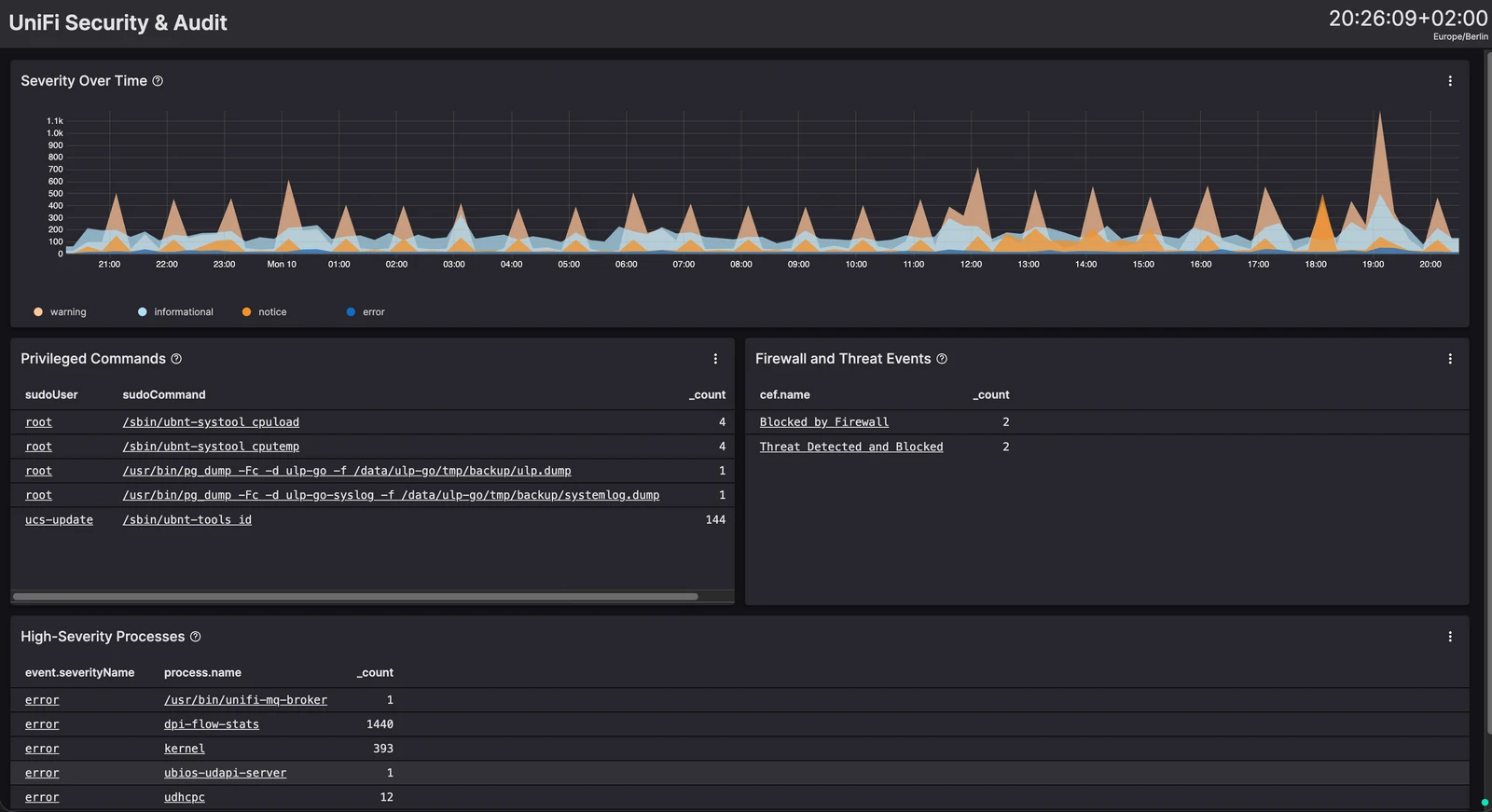
Surfaces Syslog severity, privileged commands, firewall blocks, detected threats, and high-severity processes for UniFi review. Prerequisite: [[parser:UniFi Syslog Parser]]. Setup: [[howto:Forward UniFi Syslog to a Remote Server]].
@sebastian · 10.8.2026
name: UniFi Wi-Fi Quality
updateFrequency: never
description: Wi-Fi health, anomalies, RRM scans, and roaming from UniFi Syslog.
timeSelector: {}

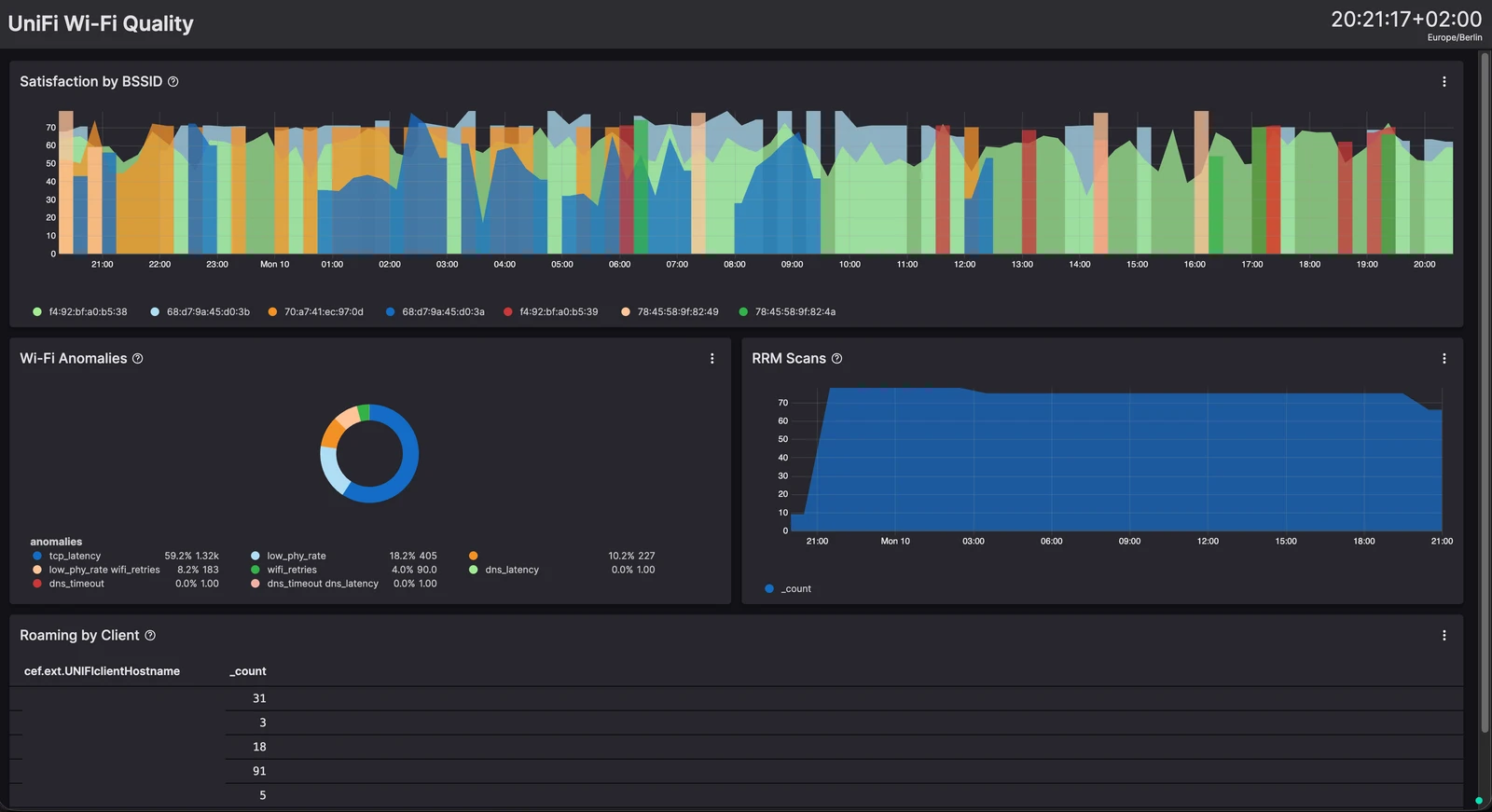
Monitors Wi-Fi satisfaction, radio anomalies, RRM scans, and client roaming to help identify unstable coverage and AP behavior. Prerequisite: [[parser:UniFi Syslog Parser]]. Setup: [[howto:Forward UniFi Syslog to a Remote Server]].
@sebastian · 10.8.2026
name: UniFi Gateway Health
updateFrequency: never
description: 'Dream Machine health: memory, services, and DPI errors.'
timeSelector: {}

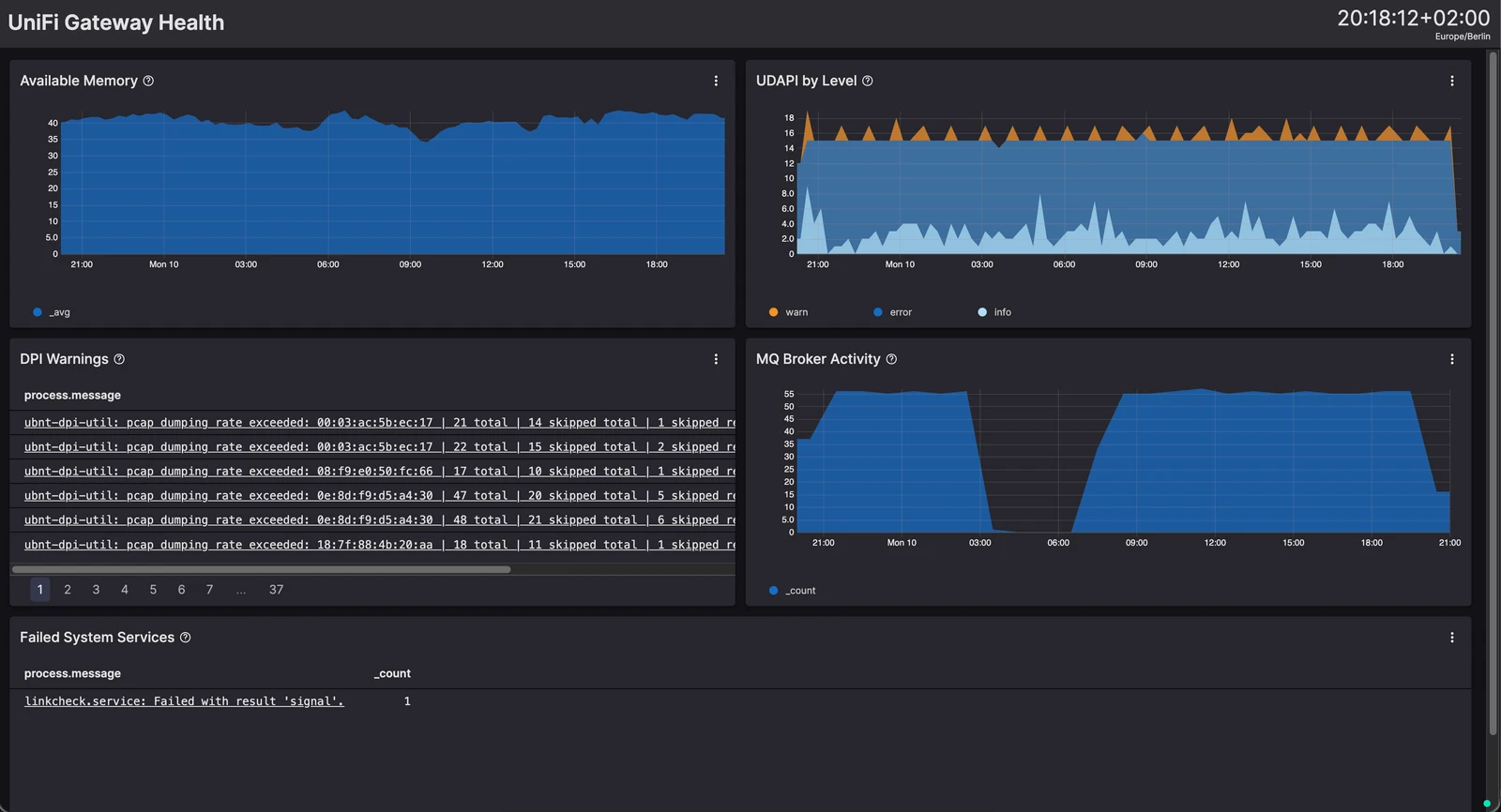
Tracks Dream Machine memory, UDAPI service levels, DPI warnings, MQ Broker activity, and failed systemd services for health monitoring. Prerequisite: [[parser:UniFi Syslog Parser]]. Setup: [[howto:Forward UniFi Syslog to a Remote Server]].
@sebastian · 10.8.2026
name: UniFi Basics
updateFrequency: never
description: Operational overview for UniFi Syslog from the Dream Machine.
timeSelector: {}

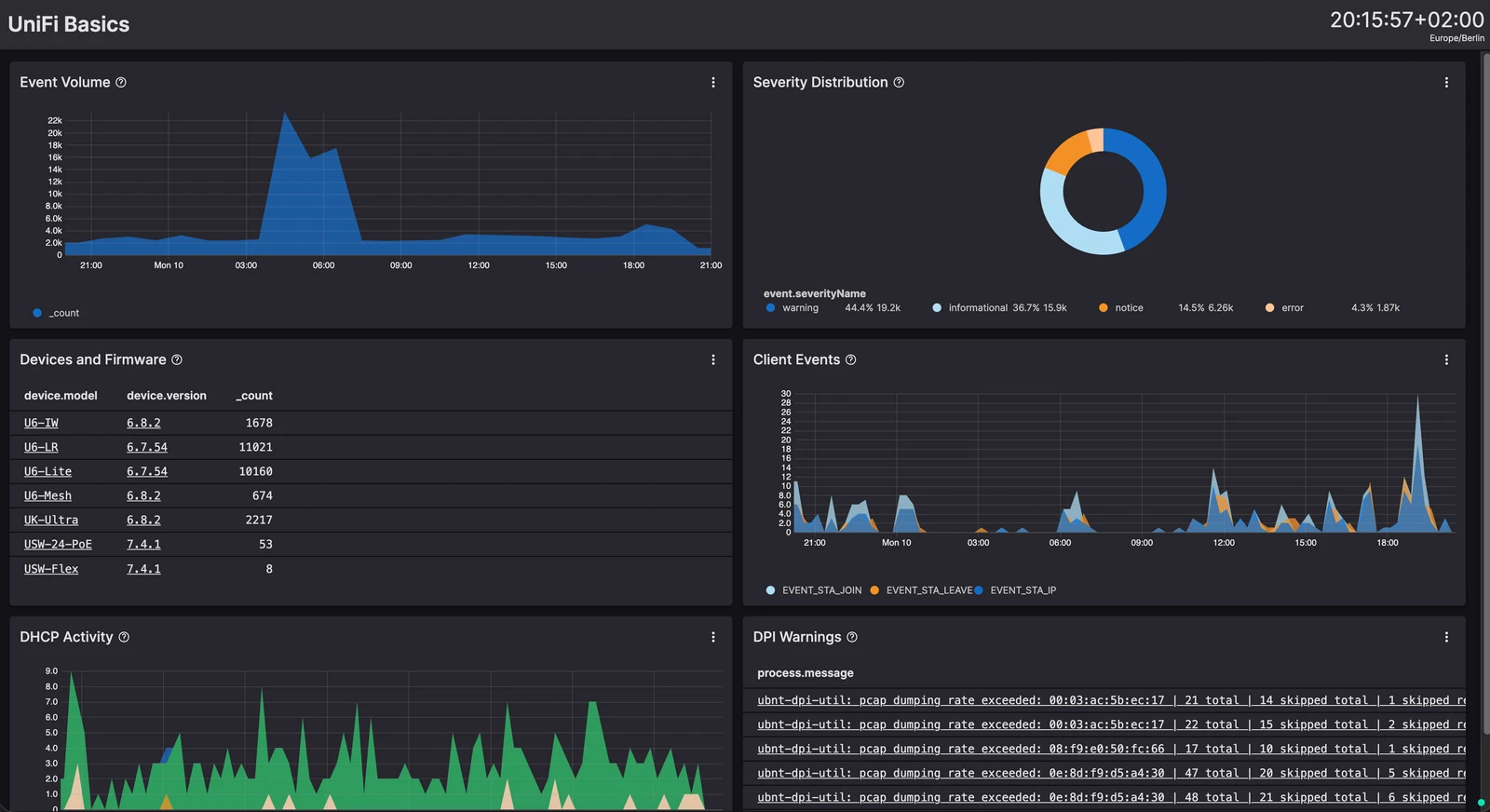
Operational overview of UniFi Syslog volume, severity, devices, client activity, DHCP transactions, and DPI warnings in one view. Prerequisite: [[parser:UniFi Syslog Parser]]. Setup: [[howto:Forward UniFi Syslog to a Remote Server]].
@sebastian · 10.8.2026
5 items
Configure UniFi Network to export selected system logs as CEF to a remote syslog or SIEM server, then verify that the receiver gets usable events.
@sebastian · 10.8.2026
Run LogScale Collector as a syslog server, map separate listeners to repository-specific ingest tokens, and understand source settings that control delivery.
@sebastian · 10.8.2026
Learn when LogScale repositories define real data boundaries and when views provide the right scoped search workspace without copying data.
@sebastian · 10.8.2026
Install and configure itrunsde/laravel-logscale to forward structured Laravel logs to Falcon LogScale through the HTTP ingest API, with redaction, fallback logging, and optional Redis buffering.
@sebastian · 6.8.2026
Step-by-step guide to get the LogScale Collector running as a Windows service, enrolled in Fleet Management, and shipping Windows Event Logs.
@sebastian · 3.8.2026